A resume is a one-page document that lists your job-relevant information for job applications. Keep scrolling for resume templates and examples, and to learn more about the differences between resumes and CVs. We also cover how to write your resume and answer resume FAQs.
If you’re targeting a job outside the UK and EU, the job advert will likely request a resume, meaning a one-page overview of your professional experience, skills, and education. A resume serves the same purpose as writing a CV to apply for jobs at home in the UK or in the EU.
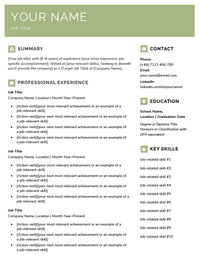
Keep scrolling to learn about the slight structure and content differences between resumes and CVs, or use this resume template to start writing (either download it as a Word document or copy and paste the text version into another word processor):
Replace the bracketed information on this resume template with your own details.
[Your job title] with [# of years] of experience [your most impressive, job-specific accomplishment]. Skilled at [your relevant skills]. Seeking to [benefit you’ll provide the company] as a [Target Job Title] at [Company Name].
PROFESSIONAL EXPERIENCE
Job Title
Company Name, Location | Month Year–Present
[Present-tense action verb][your most relevant achievement or an example of a job-relevant skill]
[Present-tense action verb][your next most relevant achievement or an example of a job-relevant skill]
[Present-tense action verb][your next most relevant achievement or an example of a job-relevant skill]
[Present-tense action verb][your next most relevant achievement or an example of a job-relevant skill]
Job Title
Company Name, Location | Month Year–Month Year
[Past-tense action verb][your most relevant achievement or an example of a job-relevant skill]
[Past-tense action verb][your next most relevant achievement or an example of a job-relevant skill]
[Past-tense action verb][your next most relevant achievement or an example of a job-relevant skill]
[Past-tense action verb][your next most relevant achievement or an example of a job-relevant skill]
Job Title
Company Name, Location | Month Year–Month Year
[Past-tense action verb][your most relevant achievement or an example of a job-relevant skill]
[Past-tense action verb][your next most relevant achievement or an example of a job-relevant skill]
[Past-tense action verb][your next most relevant achievement or an example of a job-relevant skill]
EDUCATION
School Name, Location | Graduation Date
Degree or Diploma Title
Honours or Classification with GPA equivalent
RELEVANT SKILLS
Job-related skill #1
Job-related skill #2
Job-related skill #3
Job-related skill #4
Job-related skill #5
Job-related skill #6
Job-related skill #7
Job-related skill #8
Job-related skill #9
Job-related skill #10
Resume vs. CV: Are they the same?
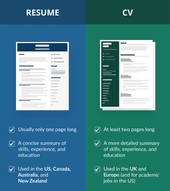
In the UK and EU, a resume is the same as a CV. Abroad, resumes and CVs have the same purpose, but their content and structure are different:
A resume requested by a company in the US, Canada, Australia, and New Zealand is different than your CV because it:
is only one page long
doesn’t include your A-levels
only features your highest level of education
But resumes and CVs have a lot in common as well. They both include:
your name and contact details at the top
an introduction
job-specific experience, skills, and education
Additionally, you should always write a cover letter for your job application, regardless of whether you submit a CV or a resume.
Resume examples: Chronological, functional, and combination formats
Below are three resume examples with different formats that you can reference when you write your own, including a:
1. Chronological resume example for experienced workers
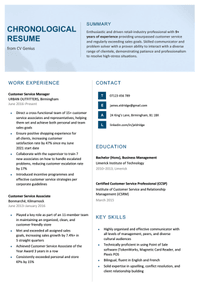
The chronological resume format emphasises your work history, starting with your most recent experience and working backwards to show employers how your career has progressed. Here’s an example of a chronological resume:
2. Functional resume example for entry-level applicants
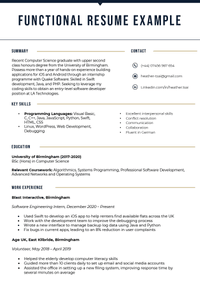
Students and recent graduates writing entry-level resumes should use the functional resume format (similar to a skills-based CV). This format highlights your skills and education near the top of the page to show employers what you’re capable of.
Here’s what a functional resume looks like:
Students can use the functional resume format to emphasise skills over experience.
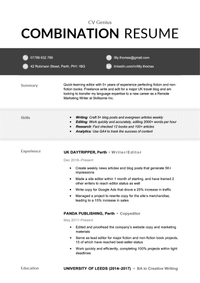
If you’re switching careers, then the combination resume format is what you should use. Like its name implies, the combination resume format is a mashup of the chronological and functional resume formats that puts the focus on both your skills and your work experience.
The resume below is a great example of the combination format:
A combination resume format is best for showcasing your transferable skills.
The best way to create a resume is by using an online builder to create your resume that offers automatic formatting and AI writing suggestions. But if you’ve got the necessary design skills and plenty of time, here’s how to write your resume:
1. Put your name and contact information in a resume header
At the top of your resume, list your name and contact information. If you’ve already got a CV, you can use its header for your resume — but if you’re applying for a job abroad, make these changes:
Remove your UK address (you can either replace it with one in your target country or leave it off completely)
Add the +44 UK country code to your phone number and leave off the first ‘0’, like this: (+44) 7123 456 789
Start your resume with an introduction — a short paragraph summarising your top skills and experience, just like a CV personal statement. This introduction (known as a resume summary or resume objective) should be 3–5 sentences or bullet points and include keywords from the job advert to catch the recruiter’s eye.
3. Make sections for your experience, education, and other relevant information
Include sections for the following information on your resume, ordering them according to how relevant they are to the job description:
Work experience: List each relevant job you’ve worked, including the company name and location, job title, dates worked there, and a bulleted list of your achievements
Extra information: Make sections to highlight information like your key skills, hobbies and interests, certifications, and publications — but only if they’re relevant to the job and fit on one page
More Frequently Asked Questions about Resumes
Here are answers to more common questions about resumes, including:
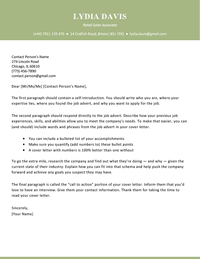
A cover letter for a resume is a document that uses business letter formatting to introduce yourself and your professional qualifications to your target employer. Unsure what a cover letter is? Here’s what one looks like:
Customise your cover letter for each job you apply to.
Contact Person’s Name 274 Lincoln Road Chicago, IL 60610 (773) 456-7890 [email protected]
Dear [Mr/Ms/Mx] [Contact Person’s Name],
The first paragraph should contain a self-introduction. You should write who you are, where your expertise lies, where you found the job advert, and why you want to apply for the job.
The second paragraph should respond directly to the job advert. Describe how your previous job experiences, skills, and abilities allow you to meet the company’s needs. To make that easier, you can (and should) include words and phrases from the job advert in your cover letter.
You can include a bulleted list of your accomplishments
Make sure you quantify (add numbers to) these bullet points
A cover letter with numbers is 100% better than one without
To go the extra mile, research the company and find out what they’re doing — and why — given the current state of their industry. Explain how you can fit into that schema and help push the company forward and achieve any goals you suspect they may have.
The final paragraph is called the “call to action” portion of your cover letter. Inform them that you’d love to have an interview. Give them your contact information. Thank them for taking the time to read your cover letter.
Sincerely,
[Your Name]
2. What is the main purpose of a resume?
The main purpose of a resume is to show employers that you’ve got the skills and experience they’re looking for and convince them to give you a job interview (and then a job offer).
3. What is a resume title?
A resume title is a line that goes under your name and includes your job title and most job-relevant information. Its purpose is to get the employer’s attention and make them want to read the rest of your resume.
Your resume title should fit on one line and be capitalised like a title (use this free online title capitalisation tool to ensure you’ve got it right).
Here’s an example of a well-written resume title:
Data-Entry Specialist with 4+ Years’ Experience Providing 100% Accurate Results.
4. What is the best format to email a resume?
The best format to email a resume in is PDF. This file format is easier to open (especially if you put a photo on your CV) and removes any red-lining of company names or industry jargon your word processor’s dictionary doesn’t recognise.
However, if the job advert asks you to send a different file format (e.g., a Word document), use that instead.
5. What is a soft copy of a resume?
A soft copy of a resume is a digital file, like a PDF or .docx file, or a text version pasted into an online job application form.
6. What is a hard copy of a resume?
A hard copy of a resume is a paper copy. When you go to a job interview, print out multiple hard copies of your resume to give to your interviewers. Even if you sent a digital version of your resume with your job application, your interviewers may not have it in front of them, and having hard copies for them to reference while interviewing you will show your professionalism.
7. What information is needed for references on a resume?
The information needed for references on a resume is their:
name
relationship to you (e.g., manager, professor, or friend)
phone number
email address
But you should only list your references on your resume if the recruiter specifically asks you to do so because references take up valuable space on your resume. Typically, employers include spaces for your references on their job application, or they ask you to send them separately.
And always ask your references for permission before sending their information to employers. Otherwise, they may ignore the employer — or worse, give you a bad reference.
8. What is a video resume?
A video resume is a short video that summarises your job-relevant information. It could be a video of you speaking, a graphic presentation, or a combination of the two formats.
Here’s an example of a good video resume that is engaging and tells employers everything they need to know about the applicant:
If you send a video resume to your target employer, remember to include your traditional written resume as well. Some recruiters prefer to read resumes rather than watch videos about them.