Wondering how to format your cover letter correctly so that you make a great first impression on employers? Read on for a step-by-step guide on structuring your cover letter, a copy and paste template you can use to organise your cover letter content, and specific format examples.
Your cover letter is your opportunity to explain to the employer why you’re the best candidate for the job. Knowing how to write a cover letter matters — but you’ll trip yourself up if you format your cover letter incorrectly.
This guide shows you how to address, structure, and present your cover letter (also known as a job application letter) so your skills, experience, and other cover letter content shine on the page.
How your cover letter format should look
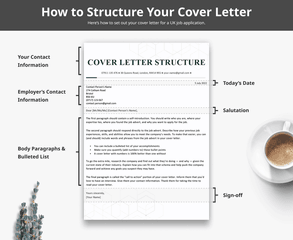
Here’s how to format a standard cover letter in the UK:
How to structure a cover letter in the UK
Your cover letter’s format is one of the most important details to be aware of when preparing your job application.
Even if you don’t have any experience yet, making an effective cover letter isn’t difficult.
To learn about making a cover letter for the first time, watch this helpful video that’ll take you through the whole process:
1. Header
Start with your contact details. You can place your contact information in a centre-aligned header or in a right-aligned list. Leave a space between your contact information and the date you’re sending the cover letter, which should be right-aligned.
If you choose to put your contact information in a cover letter heading, remember to make your cover letter stand out by:
using an extra-large font size (around 30 points) for your name so it sticks out in the employer’s mind over all of the applications they’ve reviewed
include your email address, relevant social media profiles, and phone number
You can also include your postal address in your header. Cover letter address formats follow standard UK postal guidelines. Include your street name, town or city, and postcode on separate lines, or all on one line separated by commas — whichever is consistent with your cover letter design.
If you don’t want to include your full address on your cover letter, just give your town or city. Don’t include your country name unless you’re sending your application abroad.
Here’s what the contact information and date sections of your cover letter should look like formatted as a header:
You can write the date on your cover letter numerically or in words, but remember to use the day/month/year format. For example, 5/3/2023 or 5 March 2023.
And here’s what your contact information should look like if you don’t want to use a header:
Header or no header, make sure your contact information is accurate and complete.
2. Contact person’s information
After adding the date, address your cover letter to the employer. Left-align the recipient’s contact information, which should include their:
name
postal address
phone number
email address
3. Professional greeting
Greet the employer with an appropriate salutation (such as ‘Dear [Mr/Ms/Mx] Contact Person’s Name) and follow with an engaging and clear introduction.
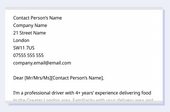
Here’s what the spacing between the contact information, greeting, and introduction paragraph looks like:
Leave a space after the recipient’s contact information as well as the salutation.
In your introduction paragraph, tell the hiring manager:
who you are, including your name and the main qualification that makes you suitable for the job (usually experience, but can also be your education)
An attention-grabbing introduction is informative, engaging, and short. Stuffing too much information in your introduction can overwhelm the reader and even put them off from reading the rest of your cover letter.
4. Relevant experience
In your second paragraph, outline your most noteworthy skills and experience for the employer.
To write cover letter body paragraphs that make employers interested in your application, review the job advert to identify which of your skills and accomplishments are most important for the role.
You can also include a bullet list of your most notable professional achievements, providing numbers that show the employer exactly what you can accomplish as an employee.
Here’s an example of an applicant using a bullet list to highlight their qualifications:
Busy employers may only read your list, so put your most impressive qualifications there.
Whether you choose to use a bulleted list or only paragraphs, make sure to include descriptive details and concrete numbers to provide evidence of the qualifications and skills mentioned in your opening paragraph.
5. Your motivations for applying
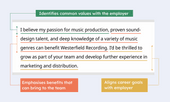
Your third body paragraph should explain why you’re applying and why you’re a great fit for the job.
There are a few ways to showcase how good of a fit you are to prospective employers:
Identify values that you share with the employer
Align your career goals with those of the employer
Emphasise a specific benefit you can bring to the team
Emphasise interests, career goals, and skills to explain why you want to work for the employer.
6. Call-to-action
Thank the employer and ask for a job interview. Your closing paragraph should also:
summarise your most marketable qualifications
include your contact information so the employer can easily follow up with you
communicate that you’re looking forward to hearing from them
7. Sign-off
End with a polite sign off that is consistent with your letter. There are two ways to close your cover letter:
Write ‘Yours sincerely,’ when your cover letter is addressed to a specific person
Use ‘Yours faithfully,’ if you addressed a generic job or department title instead of a contact person
Then type your name, and you’re finished.
Here’s how your sign-off should look:
Put single spaces between the end of your body text, your sign-off, and your name.
Copy and paste cover letter format
Here’s a cover letter outline you can copy and use as a template for your own UK job application letter:
Copy and Paste Cover Letter Format
Your Contact Information (in a Header):
Your Name
Phone Number | Email Address | Street Address, Town, Postcode
Today’s Date
Target Company Contact Information: Contact Person’s Full Name Company Name Company Street Address Town Postcode Contact Person’s Email Address Contact Person’s Phone Number
Salutation: Dear Mr/Ms/Mx [Contact Person’s Last Name],
Opening Paragraph: State your name, the title of the job you’re applying for, and how you found it. Follow up with a sentence or two explaining why you want the job, and why you’d be a good fit at the company.
Second Paragraph: In your second paragraph, include details about your relevant work experience, skills, certifications, and other information that show you have the necessary knowledge and abilities to excel in your target role. Don’t include everything — only mention the information you believe would be most valuable to the company you’re applying to.
Third Paragraph & Bulleted List: Your third paragraph should focus on accomplishments. Include examples of how you used key skills or knowledge to accomplish something impressive at a previous company. Pick examples that you believe are relevant and would also greatly benefit your target company, and make your top achievements stand out by placing them in a bulleted list:
Add numbers and examples to provide context
For example, highlight amounts of money, percentages, and numbers of customers served
Don’t just copy your CV’s bullet points — doing so makes you appear lazy
Closing Paragraph: In your first sentence, restate some of the details that prove you’re a strong candidate for the job. Then provide your contact information (email and phone number), and details about when you can be contacted. Finish by thanking the recruiter for taking the time to read your cover letter.
Sign-off: Yours sincerely,
Your Name
Cover Letter Formatting Tips
Here are 3 tips for creating a well-formatted covering letter:
black or dark blue coloured (but you can use other colours in your header)
between 10.5 and 12 points
Additionally, you should always choose an appropriate font for your CV and cover letter. Some professional fonts employers can easily read include:
Calibri
Times New Roman
Georgia
Arial
2. Keep your cover letter on a single page
Your cover letter length should be 250–400 words and must not exceed one page. Employers don’t have time to read a multiple-page cover letter, so don’t send them one.
In addition to keeping the content of your letter concise, you can limit the length of your cover letter through formatting by:
left-justifying the beginning of paragraphs, rather than indenting (which is only necessary for handwritten documents)
using single-spacing throughout your letter
3. Make sure your margins are reader-friendly
Typically, you can use your word processor’s preset margins when you write your cover letter. However, it’s okay to adjust your margins between 1.25 cm and 2.5 cm if you want to ensure the text fills one page.
You shouldn’t set your margins outside of this range because:
overly wide margins cram your information together and make it hard to read
excessively thin margins create too much white space and make your cover letter appear empty
3 cover letter format examples
Here are 3 professional cover letter formats that UK applicants commonly use:
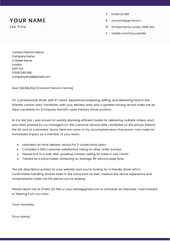
You should use the standard cover letter format if you plan to send in your cover letter as a PDF, .doc/.docx file, or printed-out document.
Format your standard cover letter as you would a traditional business letter, beginning with your contact information, a right-aligned date, and the contact person’s information — in that order.
Submitting your cover letter as a separate document is slightly more formal than writing an email cover letter. However, this approach also allows you to modify your cover letter formatting and design elements for different jobs.
For example, the above example cover letter‘s straight-laced design makes it ideal for more ‘serious’ industries, such as investment banking, finance, and law.
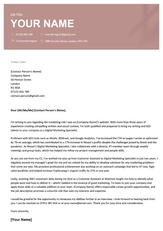
Here’s a cover letter that was written for a creative field — also using the standard cover letter format.
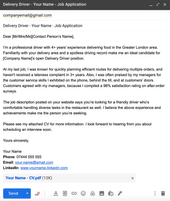
If you’re writing your cover letter in the body of an email, shorten it for easier reading. Take these steps to trim your email cover letter:
Remove the contact person’s name and address from the top
Move your contact information to your email signature
Convert any bullet points in your cover letter into paragraph form
Shorter cover letters outline the applicant’s key skills and experience in about three body paragraphs. When writing a short email cover letter, cut out nonessential information and focus on your most noteworthy traits.
3. Cover letter format for an online job application
You don’t need to include your contact information and the date when you paste your cover letter into an online job application. Those details are automatically included in the application form the employer receives after you’ve submitted it.
Frequently asked questions about cover letter formats
Want more help making your cover letter? Here are answers to 3 more questions related to proper cover letter formatting:
1. Should I include a photo in my UK cover letter?
No, you shouldn’t include a photo in your UK cover letter.
Employers generally don’t like to see photos anywhere on a job application because seeing what a job candidate looks like could lead to grounds for a discrimination claim. It’s illegal in the UK to discriminate against someone because of the way they look, their race, gender, or age. Some employers directly discard all job applications with photos.
Though there are some industries where including a photo is necessary (e.g., acting and modelling), you should put it on your CV, not your cover letter.
Putting your photo on your cover letter risks making you look unprofessional because you’re unfamiliar with standard job seeking practices. Stick to professional information that is relevant to the job and highlights your interest in the employer and industry in which they work.
2. Can a cover letter be 5 sentences?
While a 5-sentence cover letter is technically long enough to hit all the key components of a cover letter, generally, it should be longer than 5 sentences. The ideal cover letter length is a half-page to one page long (12 to 25 sentences). Writing more than 5 sentences will allow you to:
expand on your relevant qualifications (e.g., mentioning 3 achievements instead of just one),
explain why you’re a good fit for the position, which requires using 1 or 2 sentences to first demonstrate you know what the company is looking for
3. Can I reuse my cover letter for multiple jobs?
You shouldn’t send the same cover letter to multiple jobs, even if you modified the employer information and job title for the role you’re seeking.
Employers can tell when they’re looking at a generic cover letter. Candidates submitting an all-encompassing “general” cover letter often include information that isn’t relevant to the specific job, and this is a dead giveaway it’s generic. A generic cover letter also won’t tell the employer why you want to work for them specifically, nor will it highlight the benefits you offer the hiring team.
You should write a fresh, targeted cover letter for every new job application you make.