

Looking for a job in the UK? You need a good English CV that tells employers why you’re the best candidate for the position.
There are three ways to make a CV:
- Use an online CV maker
- Write a CV in Microsoft Word or Google Docs
- Pay for a professional CV writing service to write your CV
Ready? We explain the best ways to make a CV or write one, even if you have no experience to put on your CV. Let’s jump in:
Use a CV builder
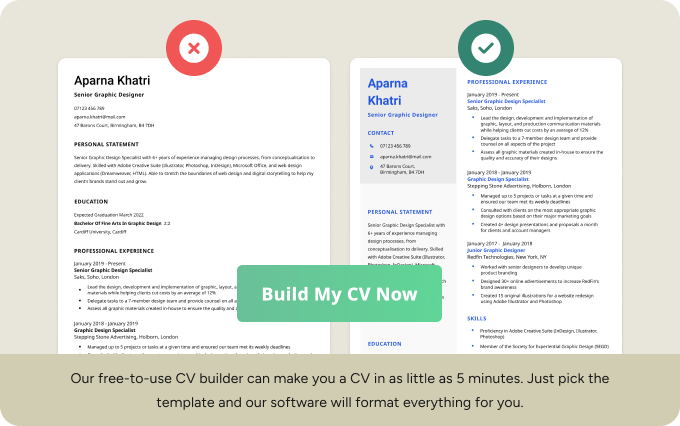
The fastest way to make a CV is by using an online CV maker.
CV makers help you build a CV with minimal effort. An effective CV maker guides you to write a CV and formats everything perfectly.
These tools work by asking you a few questions about your professional history, skills, and qualifications, and then suggest content for your CV.
Write your CV with a Word processor
Know how you want your CV to look or simply don’t want to deal with an online sign-up process? Making a CV yourself in Microsoft Word or Google Docs might be your best option.
How to write a CV from start to finish
Writing a CV yourself is easy. Here’s how to make a CV in eight steps:
- Choose the ideal CV format
- List your name and contact details at the top
- Open with a CV personal statement
- Outline your relevant work experience
- Detail your educational background
- Include a list of your key skills
- Highlight other relevant information and hobbies
- Properly lay out all of your information
To help you get a sense of what a well-written CV looks like, here’s a video breaking down exactly how to write one that’ll get you hired:
To expand on our video’s advice, here’s more information on how to organise your CV sections:
1. Choose the ideal CV format for your professional background
Before you start writing your CV, decide on an appropriate CV format.
If you have no major gaps in your employment or are still studying, use a traditional chronological CV. This CV format places your work experience section towards the top of the page, starting with your most recent work experience.
However, if you’ve had periods of unemployment or feel your skills are more impressive than your work experience, you should use a skills-based CV format.
The skills-based layout shifts the focus of your CV outline from your employment history to the skills you have to offer.
Not sure how long your CV should be? It should usually be two pages, but a one-page CV might work well for you if you’re an entry-level applicant.
2. List your name and contact details at the top of your CV
Next, it’s time to decide what information to put on your CV.
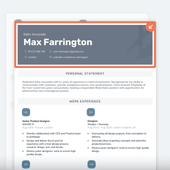
Your CV heading sits at the top of the first page and includes your:
- First and last name (don’t use ‘Curriculum Vitae’ as your title)
- Target job title
- A CV headline
- Email address (use a professional email address like [email protected])
- Mobile phone number
- Link to a professional profile or LinkedIn page
You don’t need to put your postal address on your CV because most companies will ring you to schedule an interview.
Adding colour
A good CV title can include a splash of colour. For instance, this example draws attention with its green and grey background:

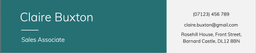
Don’t just pick your favourite colour though. Muted colours like dark green or blue are fine, but hot pink is too casual and risks making your application look unprofessional.
3. Open with a CV personal statement
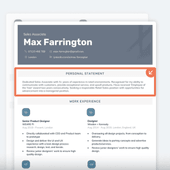
An effective CV personal statement (also called a CV personal profile, CV summary, or CV ‘About Me’) summarises your key accomplishments, qualifications, and skills. It should be short: three to four sentences or bullet points is perfect.
By adding a personal statement to the top of your CV, you make it easier for interviewers to decide if you’re worth spending time on. They can quickly scan your personal statement before deciding whether to read the rest of your CV.
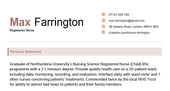
Additionally, use numbers in your personal statement to quantify your achievements. Numbers provide the employer with context, and show them what you can achieve if given a chance.
Here’s a nursing CV‘s personal statement with numbers:

4. List your relevant work experience
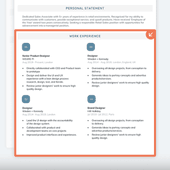
If you already have work experience, list it in your work history section.
Whatever experience you have, put your most recent job first, and then work backwards.
Just like with your personal statement, use numbers as much as possible in your work experience section.
If you don’t have exact numbers, make an educated guess — but don’t exaggerate. Your future employer might ring your former employer and ask about what you’ve said on your CV.
For each entry, list—
- your job title
- the company’s name and location
- the dates you worked there.
5. Detail your educational background
Your CV education section showcases all of your academic qualifications. Along with your work experience, your educational background tells employers about your specialities and professional interests.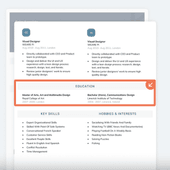
In your education section, list your highest qualification first. Qualifications should be listed in this order:
- Doctorates
- Master’s degrees
- Bachelor’s degrees
- A-Levels (or Highers/Advanced Highers in Scotland)
- GCSEs (or N5 in Scotland) or vocational equivalents
You don’t need to list all of your GCSEs if you have a university degree or A-Levels. However, many employers require candidates to have at least Grades A*–C (or Grades 9–4 under the 2017 reform) in English, Maths, and IT or other subjects, so you should mention these details. For example:
11 GCSEs A*–C, including English, Maths, and IT
6. Include a list of your most marketable skills
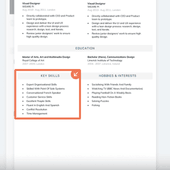
List your main professional skills on your CV in a dedicated section. Make sure you include technical skills as well as skills that show you work effectively as part of a team in the skills section on your CV.
Technical skills
Technical skills are those you specifically learn. You might have a certification or licence to prove your expertise.
For example, if you’re applying to become a delivery driver, you need to state on your CV that you have a driving licence, like so:
Full clean driving licence (category B)
You can also list skills you’ve gained from vocational qualifications on your CV. For example, if you have an NCFE CACHE Level 3 Award in Child Care and Education, you can list ‘Child Care’ among your skills. Other common technical skills include:
- Graphic design skills
- Programming languages (for example, C++, Java, SQL, and Python)
- Accounting tools (SAP, Oracle, and Intuit QuickBooks)
- Data modelling (SQL Server Management Studio and MySQL Workbench)
Soft skills
You should also add some soft skills to your CV. Soft skills are skills related to your personality, and show that you’re good at working in a team. Here are some examples of soft skills employers are looking for in candidates:
- Customer service skills
- People skills
- Communication skills
- Organisational skills
For each of your skills, include an example of when you used that skill for work in your experience section. For example:
• Honed strong customer service skills by closing sales for an average of 47 clients per week, earning £740 per week more in commission than colleagues.
7. Highlight other relevant information and hobbies
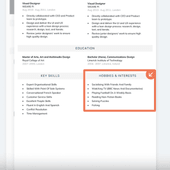
Employers appreciate an insight into your personality. So if you have space at the bottom of your CV, add a hobbies and interests section.
When adding interests to your CV, only include hobbies that reflect well on your personality and show employers your positive attributes.
For example:
- Being on your local football team shows you’re capable of teamwork
- Duke of Edinburgh’s Award shows your independence, interpersonal skills, and problem solving abilities
- Being a regular gym-goer shows your commitment to reaching personal goals
- Playing a musical instrument shows dedication and creativity
You can also use your hobbies and interests section to add extra skills or information that aren’t required for the job but still improve your job application. For example:
- If you live in a rural area, showing you have a driving licence might reassure employers that you’d be able to make it into work without relying on public transport
- If you’re applying to a job where you might interact with tourists, being able to speak other languages looks good on your CV even if language skills aren’t listed as a requirement
8. Properly lay out all of your information
It’s not only compelling content that’s important on your application, but also the CV layout you use. Follow these tips to structure your CV properly:
CV colour
A splash of colour could give you an advantage by making your CV more visually appealing. However, stick to muted, professional colours like dark blue, burgundy, or dark green.
Alternatively, pastels are acceptable because they communicate a softer, friendlier tone.
Graphics
Don’t use graphics on your CV, including infographics. Larger firms use software called applicant tracking systems (ATS) that scan CVs for specific keywords to check whether you’re qualified for the job.
ATS software often can’t read graphics, so if you’ve created a visual CV, the ATS will struggle to read your job application.
To make sure your CV gets past an ATS, always use plain text.
CV font
Use a businesslike font for your CV to show that you take the job seriously. Any of these fonts are fine for a professional CV:
- Times New Roman
- Georgia
- Arial
- Cambria
- Calibri
- Helvetica
Avoid casual or arty fonts like Comic Sans, Courier New, and Papyrus because they’re harder to read and make you come across as less professional to recruiters and employers.
Tips for writing your CV
If you’ve included each section we’ve outlined in this piece and filled it out with information relevant to the job you want, your CV should be almost ready to send out.
Here are a few last-minute CV tips to make your application even more persuasive:
Use action verbs to describe accomplishments
Many job seekers make the mistake of using the same generic phrases to describe their work duties:
- Responsible for
- Tasked with
- Entrusted with
By using these phrases, you end up describing your duties rather than your accomplishments.
Describing your duties has the unfortunate consequence of making you seem like someone who simply takes orders, rather than someone who solves problems and contributes at a higher level.
Check out this example of what not to do:
Bullet Point with Duty
- Responsible for answering phone calls from members of the public
This type of CV bullet point tells employers nothing about whether you were successful at your job. To solve this problem, use strong action verbs on your CV. Action verbs are compelling sentence starters because they make you seem like a proactive employee:
Bullet Point with Achievement
- Handled average of 47 inbound phone calls a day
Repeat keywords from the job advert
Applicant tracking systems (ATS), which scan CVs before passing them onto the recruiter, look for keywords on your CV. Boost your chances of bypassing the ATS (and catching the attention of employers) by adding keywords from the job advert.
Pay close attention to the terms that the job advert uses in the requirements section. For example, here’s a real job advert with relevant keywords underlined:

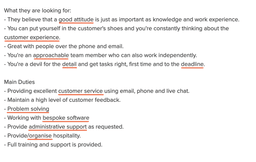
The underlined terms are skills, experience, and qualifications that the company is looking for.
In this case, you should refer to your organisational skills, administrative skills, detail-oriented personality, and all the other skills mentioned here if you’re to impress this particular employer.
Add these words and phrases to your CV — whether in your personal statement, skills list, or work history — to make sure the ATS doesn’t block your job application.
Proofread your CV
One of the quickest ways to get your application rejected is by submitting a CV with typos or grammatical errors. Even if you’re not applying for a job where knowing how to write is important, having mistakes on your CV indicates to employers that you have poor attention to detail or are too lazy to check your work.
To avoid any potential mistakes, read your CV over again a couple of times before you send it out.
Reading your CV out loud helps you notice any mistakes. Run your spell-checker on your CV, and check what it recommends.
Once you’re done checking and double-checking, give your CV to a friend, family member, or form tutor to look at. Often, a fresh pair of eyes will spot any problems you initially missed.
Choose an appropriate file format
You wouldn’t want to put together a professional CV only to be rejected because employers couldn’t open your file.
So save it as either a DOCX or PDF. These two file formats are the commonest file types used for CVs. Because all companies have the right software to view these files, they’ll be able to read your CV properly.
Sent out your CV? Keep the DOCX file to hand — you’ll need it to update your CV next time because you can’t modify a PDF file.
Pair your CV with a compelling cover letter
You also need to include a cover letter, unless the job advert says not to include one.
While your CV lets recruiters and employers see your past successes, a cover letter links your accomplishments to the company you’re applying to. For example, if you’re applying to a pub that’s opening in your village, you can use a cover letter to directly tell the landlord you’ll help them train new bar staff.
While your CV just touches upon such work experience, your cover letter makes you seem more like a person who can come in and do the work.
Leave your references off
There’s no need to add references to your CV. You don’t need to write ‘References Upon Request’, either. Instead, use the space on your CV to talk about your skills, achievements, and qualifications. Instead, provide your references directly to the employer when they ask for them.
When your cover letter and CV are ready, you can print them out or email them to companies. Happy job hunting!
CV Writing FAQs
Here are the answers to some frequently asked questions about CV writing:
What does a good CV look like in 2023?
Here’s what a good CV looks like in 2023:

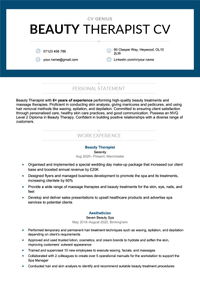
For more industry-specific ideas, look at occupation-based CV samples.
How do I write a simple CV?
To write a simple CV, download a simple CV template and fill it in. Simple CVs are ideal for newcomers to the job markets and for applying for jobs where you’re unsure whether your CV should be formal or not.
Should I put my face on my CV?
No, you should not put your face on your CV unless you’re applying for a modelling or acting job. Putting your face on your CV could hurt your chances of being employed. Companies are reluctant to hire candidates with face photos on their CVs out of fear of being accused of hiring you because you’re a particular ethnicity, gender, sex, or appearance.
More CV Writing FAQs
- Should I put my address on my CV?
- What do employers look for in a CV?
- Who can be a reference on a CV?
- How do you write degree classification on a CV?
- Can a CV be two pages?
- Can I use a Canva CV template in the UK?
- How do I write a resume for freshers in India?
- How do I show a promotion on my CV?
- Is CV Library’s CV builder a good CV maker?
- Is Reed’s CV maker an effective CV builder?


