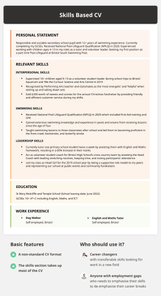
Learning how to choose a CV format is a simple way to increase your chances of earning a job interview. We show you the best CV format examples and explain the differences between a chronological CV and a skills based CV.
To increase your chances of landing your target job, you need to choose the CV format that best highlights your skills and accomplishments to recruiters.
You may find the skills based format ideal if you’re writing a CV with no experience or are switching careers.
Keep scrolling to learn about each CV format and decide which one’s best for your job application:
1. Chronological CV format
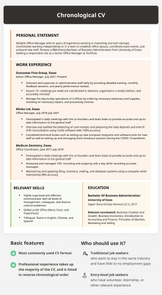
The chronological CV format emphasises your work experience and career progression. It places your most recent job at the top of your CV, then gives you room to describe your previous roles (from newest to oldest).
This top-to-bottom CV structure lets recruiters easily read your information and decide if they want to interview you:
When should I use the chronological CV format?
You should use the chronological CV format if you already have a few years of work or volunteer experience and want to showcase your career progression. This standard CV format is also effective if you want employers to see that you’ve consistently worked in a specific role or field.
How to format the work experience section of a chronological CV
Generally, the work experience section is the largest section of a chronological CV because it uses bulleted lists to describe your current and previous positions.
3–5 bullet points detailing your duties and accomplishments
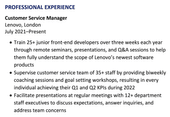
To make your work experience bullet points more impactful, begin each statement with a CV action verb such as ‘Produced’, ‘Spearheaded’, or ‘Managed’ to show employers you’re a leader in your field.
Additionally, include hard numbers in your CV whenever you can. Hard numbers like percentages, revenue earned, and time worked demonstrate the results of your work and draw attention to your strongest CV achievements.
This applicant’s CV pairs action verbs with hard numbers in their work experience section:
Place your most recent experience at the top of your chronological CV.
How to format the skills section of a chronological CV
Your skills section goes underneath your work experience and education history on a chronological CV. Listing skills on your CV communicates to employers you’re a qualified candidate with the hard skills (learnt abilities like Maths) and soft skills (personality traits such as friendliness) they’re looking for.
Here are three tips for writing your skills section on a chronological CV:
List 4–6relevant skills for the target job using a bulleted list so your skills section is clear and easy to read.
Include exact skills and keywordsfrom the job advert to show that you’re qualified for the specific role you’re targeting.
Mention a mix of hard and soft skills so prospective employers can see you’re a well-rounded applicant and a good cultural fit.
Here’s an example of a well-written chronological CV’s key skills section:
Key Skills
Proficient in spreadsheets (Excel, Google Sheets)
Comfortable collaborating with managers, peers, and direct reports
Bilingual, fluent in English and Spanish
Chronological CV format example
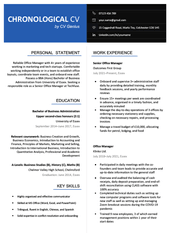
This is an example of a CV that uses the chronological CV format:
Use a chronological CV if you have a few years of relevant work experience.
Reliable Office Manager with 4+ years of experience working in marketing and tech startups. Comfortable working independently or in a team to establish office layouts, coordinate team events, and onboard new staff. Possess a BBA (Hons) Bachelor of Business Administration from University of Essex. Seeking a responsible role as a Senior Office Manager at Techfuse.
WORK EXPERIENCE
Senior Office Manager Outcomes First Group July 2021–Present, Essex
Onboard and supervise 3+ administrative staff daily by providing detailed training, monthly feedback sessions, and yearly performance reviews
Ensure 15+ meetings per week are coordinated in advance, organised in a timely fashion, and accurately minuted
Manage the day-to-day operations of 3 offices by ordering necessary stationery and supplies, checking on necessary repairs, and processing invoices
Manage a travel budget of £10,000, allocating funds for petrol, lodging, and food
Office Manager Klinko Ltd. July 2018–July 2021, Essex
Participated in daily meetings with the co-founders and team leads to provide accurate and up-to-date information to the general staff
Oversaw and audited the balancing of cash receipts, daily deposit preparation, and end-of-shift reconciliation using CLASS software with 100% accuracy
Completed technical duties such as setting up new computer programs and software tools for new staff as well as setting up and managing Zoom breakout sessions during the COVID-19 pandemic
Trained 9 new employees, 3 of which earned management positions within 1 year of their start dates
Office Coordinator Medican Denistry January 2017–July 2018, Essex
Promptly contacted 20+ patients an hour and established appropriate payment plans based on each patient’s insurance coverage plans
Answered and managed 100+ incoming and outgoing calls a day while recording accurate messages
Maintaining and updating filing, inventory, mailing, and database systems using a computer while maintaining 98% accuracy
EDUCATION
Bachelor of Business Administration Upper second-class honours (2:1) University of Essex | September 2014–June 2017, Essex
Relevant coursework: Business Creation and Growth, Business Economics, Introduction to Accounting and Finance, Principles of Markets, Marketing and Selling, Introduction to International Business, Introduction to Quantitative Analysis, Professional and Academic Development
A-Levels: Business Studies (B), History (C), Maths (B) Chelmer Valley High School, Chelmsford Graduation: June 2014, Essex
KEY SKILLS
Highly organised and effective communicator
Skilled at MS Office (Word, Excel, and PowerPoint)
Trilingual, fluent in English, Chinese, and Spanish
Solid expertise in conflict resolution and onboarding
HOBBIES & INTERESTS
Playing the piano and guitar
Watercolour painting
Making flower arrangements
2. Skills based CV format
The skills based CV format makes your skills section the largest part of your CV to focus on your transferable skills rather than your employment history. A well-written skills based CV is a modern CV format because it lets you:
focus on your key skills
draw on your life experiences (e.g., travelling, volunteering, learning a language)
adjust the CV sections to suit your needs
When should I use the skills based CV format?
You should use a skills based CV if you’d rather emphasise your skills and qualifications than your work experience.
Skills based CVs work well for applicants who:
are recent graduates
lack formal work experience
are switching industries
have prominent work gaps on their CV
work as freelancers or in creative fields
have a specific skill set
How to format the skills section of a skills based CV
Your CV skills section sits underneath your CV title and personal statement, placed where you’d list work experience on a chronological CV.
Because your skills section is more prominent on a skills based CV, choosing the right skills and grouping them appropriately is essential.
Here are four simple steps on how to include your best abilities on your skills based CV:
Think of the most relevant hard and soft skills you’ve developed throughout your life.
Read the job advert carefully for your target job and find the skills employers are searching for that most align with your own skill set. Use these skills as headings (similar to job titles in a work experience section).
Write 3–4 bullet points under each skill to showcase how you’ve used that skill professionally. Give examples and specific details.
Include action verbs and hard numbers with each bullet point to emphasise your achievements.
What to include in the work experience section of a skills based CV
Because the majority of space on a skills based CV is taken up by the relevant skills section, keep your work experience short and easy to read by adding your job title and company name without bullets describing your responsibilities.
List your jobs from most to least relevant to make sure the recruiter sees your strongest information first. You can also add your start and end dates. But if you’re not listing your jobs in chronological order, drop the dates to avoid confusion.
Skills based CV format example
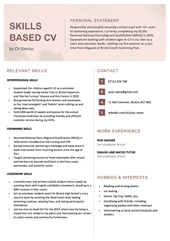
Below is an example of a skills based CV for a 16 year old who’s applying for a lifeguard position. This skills based CV format contains a small work experience section. However, the skills section includes 3–5 detailed bullet points to represent each of the applicant’s relevant skills:
A skills based CV focuses on your relevant skills and life experiences.
Responsible and sociable secondary school pupil with 12+ years of swimming experience. Currently completing my GCSEs. Received National Pool Lifeguard Qualification (NPLQ) in 2020. Experienced working with children ages 4–13 in my roles as a tutor and volunteer leader. Seeking my first position as a part time Pool Lifeguard at Bristol South Swimming Pool.
RELEVANT SKILLS
INTERPERSONAL SKILLS
Supervised 10+ children aged 9–13 as a volunteer student leader during school trips to Bristol Aquarium and ‘We the Curious’ Science and Arts Centre in 2019
Recognised by Performing Arts teacher and classmates as the ‘most energetic’ and ‘helpful’ when setting up and taking down sets
Sold £200 worth of sweets and scones for the annual Christmas fundraiser by providing friendly and efficient customer service during my shifts
SWIMMING SKILLS
Received National Pool Lifeguard Qualification (NPLQ) in 2020 which included First Aid training and CPR
Gained extensive swimming knowledge and experience in pools and oceans from receiving lessons since the age of four
Taught swimming lessons to three classmates after school and led them to become proficient in the front crawl, backstroke, and butterfly stroke
LEADERSHIP SKILLS
Currently tutor one primary school student twice a week by assisting them with English and Maths homework, resulting in a 60% increase in their marks
Act as volunteer student coach for Bristol High School’s cross country team by assisting the Head Coach with leading stretching routines, keeping time, and noting participants’ attendance
Led my class as Head Girl for the 2019 school year by being a supportive role model to my peers and representing our school at public events and community fundraisers
WORK EXPERIENCE
DOG WALKER Self-employed, Bristol
ENGLISH AND MATHS TUTOR Self-employed, Bristol
HOBBIES & INTERESTS
Reading and writing poetry
Ice skating
Dance: hip hop, ballet, jazz
Socialising with friends, including organising parties and other meetups
Volunteering at local animal hospitals and shelters
EDUCATION
MARY REDCLIFFE AND TEMPLE SCHOOL School leaving date: June 2022 GCSEs: 10+ A*–C including English, Maths, and ICT
ACHIEVEMENTS
National Pool Lifeguard Qualification (NPLQ)
How to format a CV
You should handle certain formatting details the same no matter what type of CV format you choose. Here are four tips to help you format a CV that gives you the best chance of earning an interview:
1. Ensure your CV’s length reflects your experience level
The standard UK CV length is two pages, but if you’re a recent graduate or have no experience, a one-page CV is acceptable.
And if you’re an experienced specialist or applying for executive roles, writing a three-page CV provides more space to highlight your expertise and achievements.
2. Use an appropriate font and font size
Keep your font size at 10–12 points and use an easy-to-read CV font such as Arial or Times New Roman so employers have no issues reviewing your qualifications.
3. Optimise your margins
The standard UK CV margins are 2.5 cm, but you can adjust your margins down to 1.27 cm if you need to fit more text onto the page.
When you adjust your margins, just make sure your CV doesn’t look either too packed or too empty.
4. Save your CV as a PDF
Sending your CV in PDF format ensures your CV design retains its formatting no matter who downloads it or what graphics you used (e.g., CV icons).
Frequently asked questions about CV formats
Here are answers to three of the most common questions asked about CV formatting:
The best CV format is one that successfully showcases your most job-relevant information to the recruiter. So don’t get confused by labels like ‘chronological CV’ and ‘skills based CV’. Just arrange your CV sections so your best selling points are easy to find and read, and you’ll have the best CV format for you.
2. Does a CV have a picture?
Typically, a CV doesn’t have a picture because adding one could lead to recruiter bias against your age, gender, or race. However, if you’re applying for a job that’s based on your appearance — acting or modelling jobs, for instance — including a headshot on your CV can help you stand out to employers.
3. What are the 5 main things your CV should include?
The 5 main things your CV should include are your:
name and contact information
personal statement
relevant experience (professional and volunteer/internship)
education
skills
More CV format FAQs
Click on the links below to learn even more about how to format your CV: